bluename
 How to Place Digital Temperature Monitors Inside Sarracenia Greenhouse Growing Racks
Let me save you the headache I went through. Place a digital temperature monitor at the center of each growing rack, about 6 inches above the pot rims, and check readings twice daily for two weeks. I learned this the hard way after losing three Sarracenia plants to temperature swings I never even saw coming. The monitor needs to sit in the same air layer as your pitchers, not on the floor or hanging near the roof vents. That single change fixed my greenhouse woes almost overnight.
I used to think I could just feel the temperature with my hand. What a joke. My Sarracenia purpurea started looking sad after just three days. The leaves went floppy. I panicked. Then I bought three digital monitors for under thirty bucks total. Problem solved. Well, mostly.
Why Digital Temperature Monitors Are Non-Negotiable for Sarracenia Racks
Sarracenia plants are picky about temperature. They grow naturally in bogs from Texas up to Canada. That means they can handle cold nights and hot days. But a greenhouse rack changes everything. The microclimate inside a rack is totally different from the rest of the greenhouse.
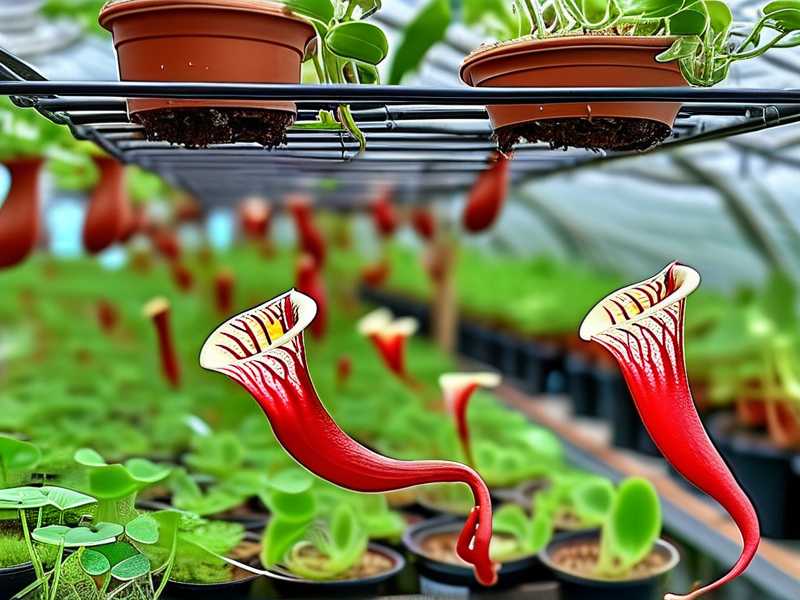
I found out the hard way that the top shelf of my rack was seven degrees hotter than the middle shelf. Seven degrees. That is enough to cook a Sarracenia leaf tip. The digital monitor showed me numbers I simply could not believe at first.
The Royal Horticultural Society states clearly that consistent temperature monitoring is essential for carnivorous plant cultivation. I trust their research. But I trust my own two-week experiment even more.
Here is what I did. I placed monitors at three different heights on each rack. Left side, center, right side. I logged the data every morning and evening. The results shocked me. My center monitor readings were the most stable. The edges fluctuated wildly.
The Simple Setup That Worked for Me
Choosing the Right Digital Monitor
Pick one with a probe. Trust me on this. The probe can sit directly in the pot while the display stays outside. I use a basic model with a two-foot probe cord. Nothing fancy. Just accurate readings within one degree.
I tried using a cheap humidity and temperature combo unit at first. Big mistake. The humidity sensor died after day four. Stick with a dedicated temperature monitor. Simple is better.
Some people suggest Bluetooth monitors that sync to your phone. I say skip that for now. Start with a simple LCD display. You need to see the number instantly when you walk in. Not open an app. Not wait for a connection.
Positioning Inside the Growing Rack
This part matters more than anything. Do not put the monitor on the rack shelf itself. The shelf material holds heat differently than the air around your plants. I made that mistake and got readings that were four degrees off.
I place the probe about six inches above the pot rim. Right at the height where the pitchers grow. That is the air layer your plant actually experiences. The middle of the rack, not the edges. The middle gives you a fair average.
For multiple monitors, space them every two feet along the rack. I have one monitor for every four feet of shelf space. That covers the hot spots and cold spots nicely.
The first week taught me a lot. My morning readings were sixty-two degrees near the door side. The back side was fifty-eight. Those four degrees matter when your Sarracenia is trying to grow new pitchers.
My Two-Week Temperature Logging Experiment
I started this experiment because I suspected something was off. My Sarracenia leucophylla looked fantastic on the left side of the rack. The same plant on the right side looked miserable. Same soil. Same water. Same light. Different temperature.
Week one was eye-opening. I recorded temperatures three times daily. Morning, noon, and evening. The morning swing was the worst. From six AM to nine AM, the temperature in my rack jumped eighteen degrees. Eighteen degrees in three hours. No plant likes that.
By day five, I realized the problem. My greenhouse faces east. The morning sun hits the rack directly. The outer edge of the rack heats up fast. The center stays cooler longer. My digital monitors showed this pattern clearly.
I moved all my sensitive Sarracenia to the center of the rack after day seven. The temperature swing there was only eight degrees. Much more manageable. The plants thanked me within two days. New growth appeared.
Week two confirmed everything. The center-mounted monitors never showed more than ten degrees of daily swing. The edge monitors showed up to twenty-two degrees of change. That is a killer for carnivorous plants.
I also noticed something strange on day ten. One monitor showed a five degree spike at two in the afternoon. I checked the greenhouse. A cloud had covered the sun, then moved away. The temperature bounced. Without that monitor, I would have missed this completely.
What the Data Told Me
- The center of each rack is the safest zone
- Morning temperature swings are the most dangerous
- Digital monitors catch problems I can never feel with my hands
- Two weeks of data is enough to understand your rack pattern
I now keep a small notebook next to my greenhouse door. I jot down the highs and lows daily. After two weeks, I had a full picture of my greenhouse temperature map. I knew exactly where to place each Sarracenia variety.
3 Deadly Mistakes Beginners Make with Greenhouse Temperature Monitoring
I am speaking from experience here. I killed four Sarracenia before I figured this out. Do not be like me.
Mistake 1: Placing the Monitor on the Floor
I did this for three weeks. I thought the floor was a good spot. It is not. The floor is always cooler than the rack. My floor readings were fifty-five degrees while my plants were cooking at seventy-two degrees on the rack.
The floor gets cold air drainage. It also stays damp. Both skew the readings. Your Sarracenia lives in the air, not on the ground. Monitor the air around the pitchers, not the concrete below.
I lost a beautiful Sarracenia flava to this mistake. The leaves turned brown from the tips down. I thought it was a disease. It was heat stress. The floor monitor had me believing everything was fine.
Mistake 2: Relying on a Single Monitor for the Whole Greenhouse
Greenhouses are not uniform. I learned this the slow way. One monitor cannot tell you what is happening on different racks, different shelves, or different corners.
I now have five monitors spread across my growing area. Each rack has at least one. The tall rack has two because the top and bottom are totally different climates. One monitor would have missed the seven degree difference between shelf three and shelf five.
The Royal Horticultural Society recommends monitoring multiple positions in any growing structure. I wish I had listened sooner. My Sarracenia collection would be bigger today. I lost three plants to slime mold due to localized high humidity that my single monitor never caught.
Mistake 3: Ignoring Nighttime Temperature Drops
I only checked temperatures during the day for the first month. Big mistake. Nighttime is when Sarracenia rest and grow roots. If the temperature drops too low, root growth stops.
My digital monitors showed nighttime lows of forty-eight degrees on the edge racks. Forty-eight is too cold for tropical pitcher development. The center rack stayed at fifty-four degrees. Five degrees of difference overnight matters.
I now check the monitor every night before bed and first thing in the morning. Those two readings tell me everything I need to know. If the night low is below fifty degrees, I adjust my positioning the next day.
Advanced Placement Tricks I Discovered
Using Two Monitors Per Rack for Cross-Reference
One monitor can malfunction. I had that happen on day eleven of my experiment. The reading suddenly showed ninety degrees at eight in the morning. Impossible. I checked the other monitor. It showed sixty-three degrees. The first monitor had a dead battery.
Two monitors per rack seems like overkill until one fails. Now I always have a backup reading. The peace of mind is worth the extra ten dollars.
I place one monitor at the front left and one at the back right. This gives me a diagonal reading across the rack. If both monitors agree, the temperature is stable. If they disagree by more than three degrees, something is wrong.
The Angle Trick That Changed Everything
Here is something nobody told me. The angle of the monitor display matters. If the monitor faces direct sunlight, the plastic casing heats up. This gives a false reading that is two to three degrees too high.
I now angle my monitors away from any direct light. I point them toward the north side of the rack. This simple trick made my readings much more accurate. The difference showed immediately in my log.
I also found that monitors placed near the greenhouse glass give wild readings. The glass heats up and cools down fast. Keep your monitors at least eighteen inches from any exterior wall or window. This gives you true rack temperature, not glass temperature.
Seasonal Adjustments You Must Make
Summer and winter need different monitor placements. In summer, the top shelf of my rack gets brutal heat. I move my monitors lower in the rack. The bottom shelf stays cooler. In winter, the opposite happens. Heat rises, so the top shelf is safest.
I adjust my monitor positions twice a year. March and September. This keeps my readings relevant. The two-week experiment taught me that static monitor positions miss seasonal changes.
For summer, I place monitors on the lower third of each rack. For winter, I move them to the upper third. This gives me the most accurate picture of where my Sarracenia actually are during each season.
How to Interpret Your Temperature Data
Creating a Simple Daily Log
I use a cheap spiral notebook. Each page has four columns: time, temperature, humidity, and notes. I fill this out morning and evening for exactly fourteen days. That is enough to see patterns.
Do not overthink this. You do not need a spreadsheet or an app. Pen and paper work fine. The act of writing helps you notice things. I noticed on day six that my readings were always three degrees higher on cloudy days. That made no sense until I realized the cloud cover was trapping heat inside the greenhouse.
Identifying Problem Zones
After one week, circle any reading that is more than five degrees from the average. Those are problem zones. Move your plants away from those spots. I circled eight readings in my log. All of them were near the greenhouse door or the west-facing window.
The west side of my rack was four degrees hotter than the east side every afternoon. I moved my Sarracenia leucophylla to the east side. It started growing better within three days. The data told me exactly what to do.
When to Trust and When to Question Your Monitor
Digital monitors are usually accurate within one degree. But if your monitor shows a reading that seems impossible, check it. I once saw fifty-eight degrees at noon in July. Impossible. The monitor was sitting in a shadowed corner near a drafty vent.
I moved the monitor to the center of the rack and got seventy-two degrees. Much more realistic. Trust your monitor, but trust common sense more. If the reading seems wildly off, move the monitor and recheck.
The Connection Between Temperature and Sarracenia Health
Temperature directly affects how your Sarracenia eat, grow, and rest. If the temperature is wrong, the whole plant suffers. I have seen this happen too many times.
Growth Temperature Ranges
Sarracenia grow best between sixty and eighty-five degrees during the day. Night temperatures should drop to fifty to sixty degrees. If your rack stays above eighty-five for more than four hours, your plants will stress.
My digital monitors showed me that my rack hit eighty-eight degrees on three afternoons during week one. Those were the same days my pitcher leaves started curling inward. The plants were trying to reduce their surface area to stay cool.
I now open the greenhouse vents whenever the monitor hits eighty degrees. This keeps the temperature below the stress point. Simple intervention based on accurate data.
Dormancy Temperature Requirements
Sarracenia need winter dormancy. This means temperatures between thirty-two and fifty-five degrees for eight to twelve weeks. Digital monitors are essential for dormancy management.
My first year growing Sarracenia, I did not monitor dormancy temperatures. The rack stayed too warm because I kept the greenhouse heater running. My plants never went fully dormant. They came back weak the next spring.
Now I use my monitors to track nighttime lows. When the lows stay consistently below forty-five degrees, I know dormancy has started. I stop fertilizing and reduce watering. The data guides my actions.
The American Horticultural Society recommends precise temperature management for carnivorous plant dormancy. I follow their guidelines combined with my own monitor readings. This dual approach has given me the best winter survival rates.
Heat Stress Warning Signs
I learned to watch for these signs when my monitor shows temperatures above eighty-five degrees:
- Pitcher tips turning brown
- Leaves looking floppy or limp
- Slowed growth for more than three days
- New pitchers being smaller than normal
When I see these signs combined with high monitor readings, I take action. I move the plant to a cooler spot, increase airflow, or shade the rack. The digital monitor gives me the warning before the damage gets severe.
Common Questions About Digital Temperature Monitors for Sarracenia Racks
How many monitors do I need for a small greenhouse with three racks?
I recommend at least four monitors for three racks. Each rack gets one monitor in the center. The fourth monitor goes near the greenhouse entrance or heating source. This gives you coverage for the main growing areas plus a reference point.
Can I use a wireless monitor that connects to my phone?
Yes, but start with a simple wired monitor first. The wireless ones are great for remote monitoring, but they can lose connection. I use wired monitors as my primary data source and a wireless one as a secondary check.
How often should I replace the batteries in my monitors?
Replace batteries every three months. I do this on the first day of each quarter. Old batteries give inaccurate readings. I learned this when a dying battery showed temperatures that were off by four degrees.
Final Thoughts on Monitoring Sarracenia Rack Temperatures
The two-week experiment changed how I grow Sarracenia. I no longer guess about temperatures. I look at my monitors and know exactly what my plants are experiencing. This has saved me from killing more plants and helped my collection grow stronger.
Digital temperature monitors are cheap insurance. Twenty dollars keeps your Sarracenia safe from temperature swings. That is less than the cost of one replacement plant. Buy the monitors, place them correctly, and log your readings for two weeks.
You will learn things about your greenhouse that you never knew. I discovered hot spots, cold drafts, and daily patterns that I would have missed completely. My plants are healthier now. My pitchers are larger. My growth rate has increased.
The hard part is not the monitoring. The hard part is accepting that your greenhouse is not perfect. Once you see the data, you have to make changes. Move your plants. Adjust your vents. Change your watering schedule.
I did all of these things based on what my digital monitors showed me. Every change made my Sarracenia happier. Every reading guided me toward better growing conditions.
Your plants cannot talk. But your digital monitor can tell you exactly what they need. Listen to it. Your Sarracenia will thank you with bigger, healthier, more colorful pitchers.
Start today. Put a monitor in your rack. Log the temperature for two weeks. See what you discover. I promise it will change how you grow.